Example: Estimating Peptide Binding Affinity from Amino Acid Sequences
Peptides are short chains of amino acids that perform a wide range of biological functions, depending on the specific sequence of amino acids. Understanding how amino acids interact with other molecules is key to understanding the mechanisms of genetic diseases and to constructing therapies to address these diseases.
One form of interaction is the question of how well a peptide binds to a specific molecule (this is known as binding affinity). For this assignment, we will use a data set that includes a measure of binding affinity for a large number of peptides toward the molecule HLA-DRB1*15:01. Our goal is to predict the binding affinity for novel peptides.
Amino Acids
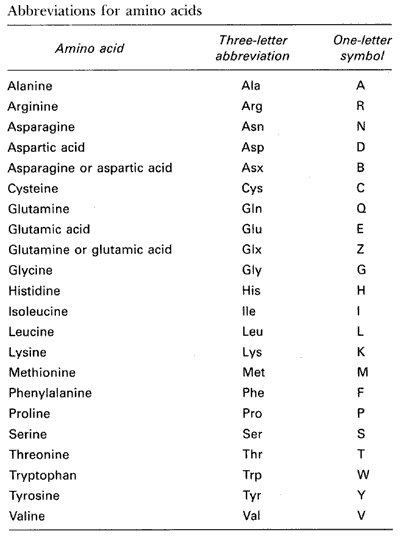
A total of 22 amino acids make up the building blocks for all peptides and proteins. The following table gives the names and one-letter codes used to represent these amino acids:
Data
We include one example dataset file: 1501_fold1 This CSV file includes three columns:
- String of amino acids. String lengths can vary by example
- Scaled binding strength (0 … 1)
- (added) Binary class: binds well (1) or not (0)
Data Configuration
Notes
- The CSV file does not include header names, so these are supplied in the configuration
- Because the example inputs are strings, we must take two preprocessing steps (could be defined here or in the network configuration):
- Tokenization: translate a string into a sequence of integers
- Split by individual characters since they map to individual amino acids
- We define the maximum number of unique tokens (we happen to know that this is 24). Each unique token is assigned a unique integer prior to the learning process (based on the training data set); tokens are include a “no value” and an “unknown value” token.q
- We declare the maximum number of tokens in the sequence (30)
- Embedding: translate token integer into a vector
- Embedding dimensions is the size of the vector
- This mapping is learned during model training
- Tokenization: translate a string into a sequence of integers
Prediction with Temporal or Spatial Data
For data that are gridded in time or space, the relative positions of the tokens can be important for predicting some value. For this Amino Acid example, a specific subsequence of amino acids can result in a necessary functional component of the peptide in terms of its ability to bind to the HLA-DRB1*15:01 molecule. And, where in the peptide this subsequence occurs may or may not affect the binding affinity. It is therefore often important to choose models that explicitly model the spatial/temporal nature of the data.
Networks
We provide several different network architectures to demonstrate the range of models that are possible:
- Fully connected network: this architecture throws out all of the spatial information contained within the string. As a result, the model must learn all possible locations for important subsequences.
- Convolutional Neural Network: this implementation is composed of four convolution modules, followed by three fully-connected hidden layers.
- Simple Recurrent Neural Network: includes a single RNN layer of 60 recurrent neurons. This is followed by three fully-connected hidden layers.
- Deep Simple Recurrent Neural Network: two RNN layers (60 and 40 units, respectively). The first layer produces an output vector for every token; the last layer produces only an output vector at the end of the tokens. This model also includes
- GRU Recurrent Neural Network: GRU RNNs tend to train faster than Simple RNNs. This network has three RNN layers (60, 50, 40 neurons).
- LSTM Recurrent Neural Network: Like GRU RNNs, LSTMs tend to train faster than Simple RNNs.
Experiment Configuration
The experiment configuration file provides default experiment control parameters. Note that some of these are overridden by other configuration files (e.g., some networks require different configuration choices).
Executing an Experiment
Basic invocation:
python $ZERO2NEURO_PATH/zero2neuro.py @data.txt @experiment.txt @network.txt -vvv --force
where network.txt can be substituted for any of the above network configuration files.
Switching to a Classification Problem
By default, the above data and network configuration files set up a problem of regression, where the model is to predict the non-negative scaled binding affinity value. We can change the problem into one of classification using the classification_override.txt as follows:
python $ZERO2NEURO_PATH/zero2neuro.py @data.txt @experiment.txt @network.txt @classification_override.txt -vvv --force
Classification Problem with Stratification
We can change the classification problem into one that randomly assigns samples to folds using stratification using classification_override2.txt as follows:
python $ZERO2NEURO_PATH/zero2neuro.py @data.txt @experiment.txt @network.txt @classification_override2.txt -vvv --force
References
- Paper: Improved methods for predicting peptide binding affinity to MHC class II molecules
- Original Data Set
Bonus Example: TF-Datasets
The data set described above is represented in Zero2Neuro as a numpy array. The alternative to this representation is a TF-Dataset, which is more structured, but can be much more efficient when loading the data from disk and managing it in RAM. These efficiencies are particularly visible when the data set is very large (even large enough to not fit entirely in the available RAM).
In the following example, we translate the Amino Acid dataset from CSV format to TF-Dataset format. As part of this process, we first split the CSV dataset into 10 folds before saving each fold separately in a TF Dataset file format. These folds can then be reassembled later to form the training, validation, and testing data sets on the fly.
Translate the input amino acid tabular data into a set of TF Dataset folds.
- Create the local ‘ds’ directory:
mkdir ds - Generate the folded data without performing an experiment
python $ZERO2NEURO_PATH/zero2neuro.py @data.txt @experiment.txt @network.txt -vvv --data_save_folds ds/amino --data_representation tf-dataset --nogo
Notes:
--data_save_foldsindicates where the TF_dataset directories should be placed. These are placed in ds/amino_fold_00.ds, ds/amino_fold_01.ds, … Each is a directory with a small number of files--nogomeans that only the data are saved and no training is performed during this extraction
Use the TF-Dataset files instead of the raw amino acid file
The key difference is that we now use an alternative data configuration file:
- data_tf.txt: 10 files, 10 folds, n-fold-cross-validation
- data_tf2.txt: 3 files, 3 folds, fixed assignment
- data_tf3.txt: 10 files, 5 folds, n-fold-cross-validation; each pair of files is combined to create a single fold
Example:
python $ZERO2NEURO_PATH/zero2neuro.py @data_tf.txt @experiment.txt @network.txt -vvv